Every app wants your API key
Adding AI to an app today usually means pasting a paid key into it, or trusting the app's own servers with your prompts. BLAID keeps keys in your system keychain. Apps get a grant you can narrow or revoke, never the key.
 BLAIDGet notified
BLAID · Bridge for Local AI Dispatch
BLAID is a small service you install once. It holds your model providers and API keys, and gives games, websites and desktop apps one API to use them. Apps never see a key: you approve each one once, and pick the model it gets.
Either each app asks for your keys, or it ships its own model. BLAID is the third option: the apps you approve share the models you already have, on your terms.
Adding AI to an app today usually means pasting a paid key into it, or trusting the app's own servers with your prompts. BLAID keeps keys in your system keychain. Apps get a grant you can narrow or revoke, never the key.
Bundling gigabytes of model weights in each game ignores the models and GPU you already have. With BLAID a game asks for a role such as npc-dialogue, and gets whichever model you mapped to it.
Browsers keep tightening access to localhost: Chrome added local-network prompts in 142 and a separate loopback permission in 145. BLAID's extension relays pages to the service over Native Messaging, one site at a time.
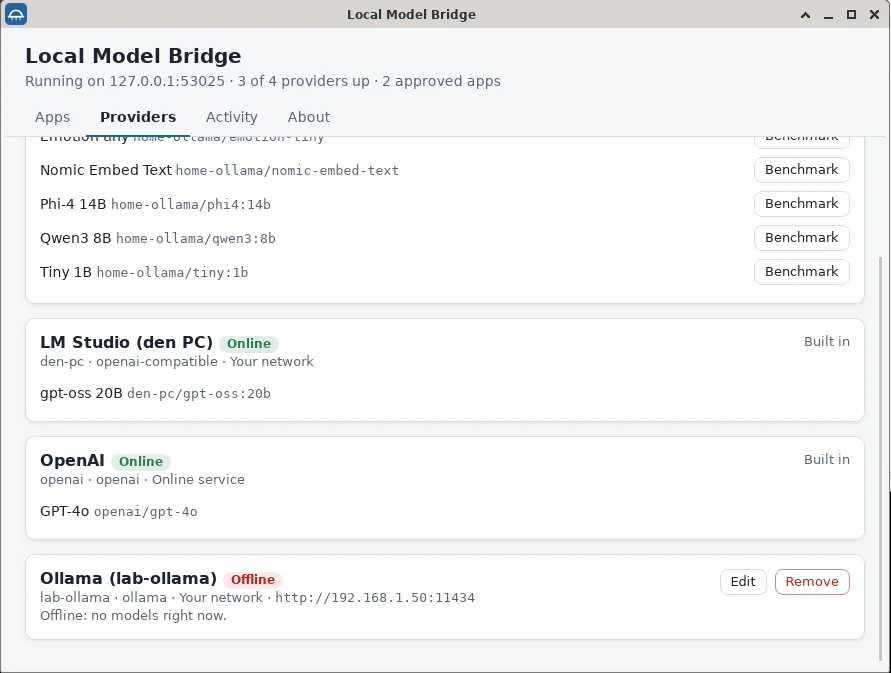
It runs in the tray. Ollama on this computer is picked up on its own. Add LM Studio, llama.cpp or any OpenAI-compatible server by address, a model server on another PC, or OpenAI and Anthropic with a key that goes straight into your OS keychain.
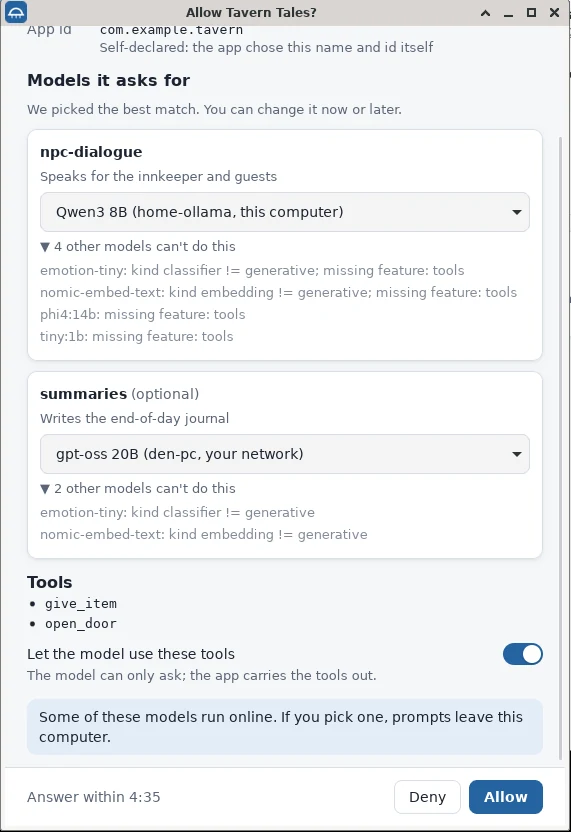
The app names the roles it needs, like npc-dialogue, and what each one requires. BLAID pre-selects the best model that qualifies, greys out the rest with the reason (missing feature: tools), lists the tools the app's model may ask for, and says plainly if a choice would send prompts online.
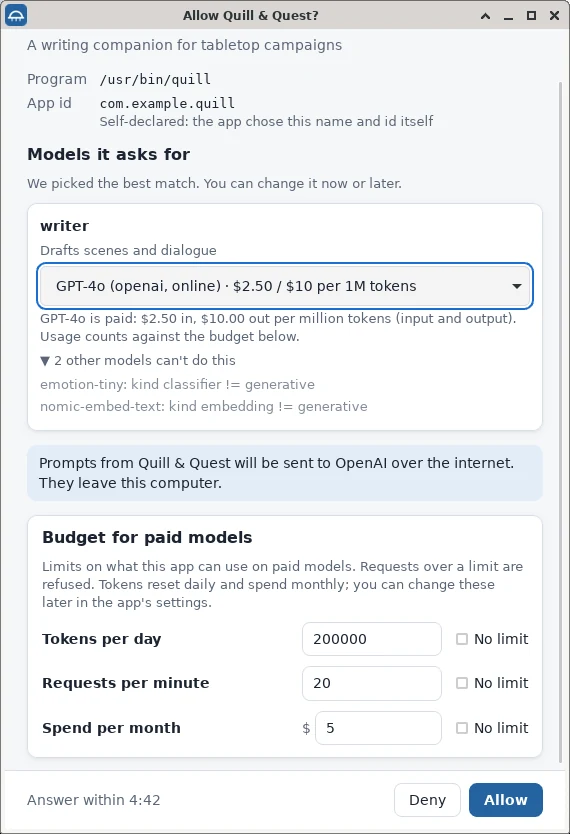
Pick a paid online model and BLAID shows its price, says the prompts will leave your computer, and pre-fills a budget for that app. The same approval then covers every route the app arrives by: its website, its desktop build, a new game world.
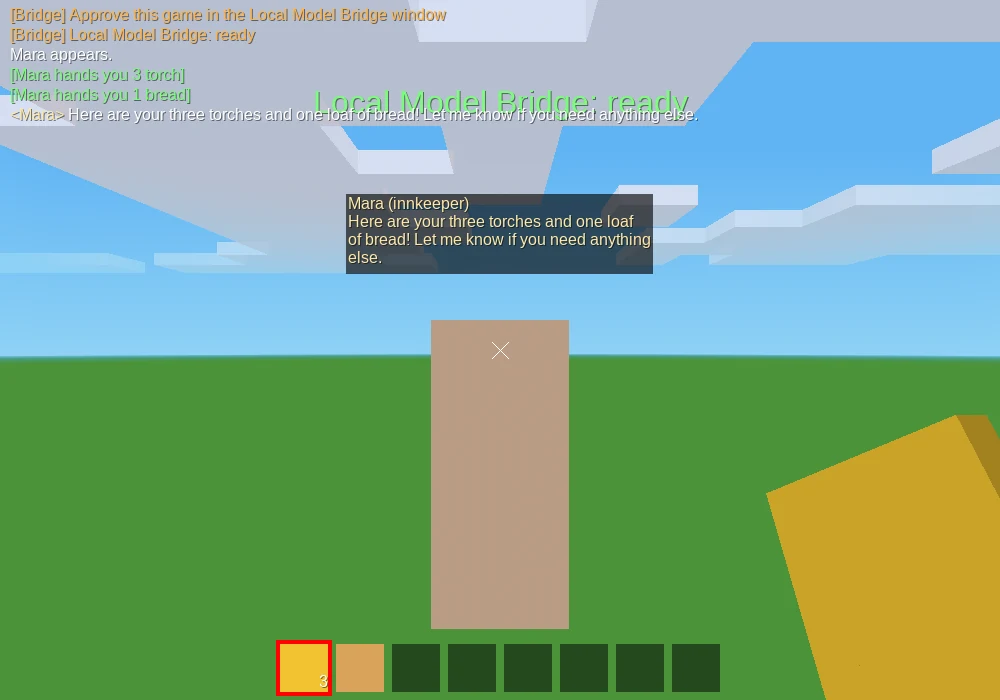
Here a Luanti mod with no network access streams the innkeeper's lines through files in its own world folder, and she hands over torches and bread with a tool call. Below, a web page reaches the same models through the extension.
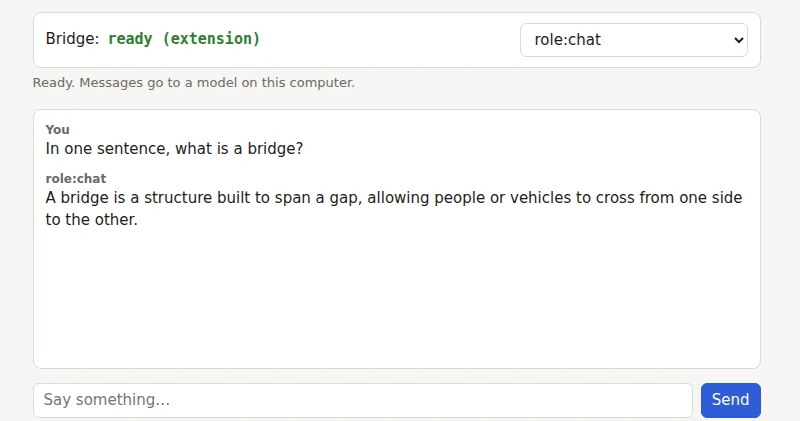
50 seconds, two apps: a website asks for access through the extension and streams a reply, then a sandboxed game mod does the same with no network at all.
BLAID owns every key, approval and model choice. Apps reach it by whichever route their platform allows; the messages are the same on all of them.
Apps
BLAID service
Your models
Declare your roles and tools once. Show whatever state you get. Ask for access from a button. Then prompt, stream, run multi-turn sessions and tool calls like any Open Responses client.
import { Bridge } from "@local-model-bridge/sdk";

const bridge = await Bridge.connect({
  app: { id: "com.example.tavern", name: "Tavern Tales" },
  roles: {
    "npc-dialogue": {
      description: "Speaks for the innkeeper",
      require: { features: ["tools"], minContextTokens: 8192, general: { min: "ref:gpt-4o-mini" } },
    },
  },
  tools: [{ name: "give_item", description: "Hands the player an item" }],
});

bridge.addEventListener("statechange", () => render(bridge.state, bridge.ui()));
if (bridge.state === "no_grant") await bridge.requestAccess(); // from a button

for await (const chunk of bridge.promptStreaming("Good evening!", { role: "npc-dialogue" })) {
  showText(chunk);
}
Node, Electron and browser pages share one SDK. Its names follow Chrome's Prompt API, and it falls back to Chrome's built-in model when no BLAID is installed.
from local_model_bridge import Bridge

bridge = Bridge.connect({
    "app": {"id": "com.example.tavern", "name": "Tavern"},
    "roles": {"chat": {"description": "Talks to the player",
                       "require": {"features": ["tools"]}}},
})
print(bridge.state, bridge.ui().title)   # a detection state and the text to show

if bridge.state == "no_grant":
    bridge.request_access()              # opens the consent window, waits for the user

for chunk in bridge.prompt_streaming("Tell me about the inn."):
    print(chunk, end="", flush=True)
Standard library only, Python 3.11 or later. A background thread keeps the state current.
using LocalModelBridge;

using var bridge = await Bridge.ConnectAsync(manifest);
bridge.StateChanged += (_, e) => Render(e.State, bridge.Ui());

if (bridge.State == DetectionState.NoGrant)
    await bridge.RequestAccessAsync();          // opens the consent window

await foreach (var chunk in bridge.PromptStreaming("Tell me about the inn.",
                   new GenerationOptions { Role = "npc-dialogue" }))
    Console.Write(chunk);

// Unity: add a BridgeBehaviour; callbacks arrive on the main thread.
netstandard2.1, so one client runs in .NET 8 and in Unity 2021.3 or later.
-- Luanti: no sockets, no HTTP, no settings changed. Just files in the world folder.
local B = dofile(core.get_modpath("mymod") .. "/bridge.lua")
local client = B.new({dir = core.get_worldpath() .. "/bridge",
                      manifest = MY_MANIFEST, deps = B.luanti_deps()})
client:start()
core.register_globalstep(function(dtime) client:step(dtime) end)

client:respond({model = "role:npc", input = "Hello!", tools = TOOLS,
  on_text = function(delta) say(delta) end,
  on_tool = function(name, args) return give(args.item) end})
The file transport: any engine that can write a file and read one back can use it.
Package names are from 1.0.0-rc.1 and change with the rename to BLAID; nothing is on npm, PyPI or NuGet yet.
Detection always returns exactly one of seven states, and every SDK ships ready-made wording for each, so “BLAID isn't installed” and “this site isn't enabled” never look like errors.
not_installedNo BLAID on this machineOffer the downloadextension_missingWeb: no extensionInstall BLAID and its extensionnot_enabledWeb: site not enabledEnable this site from the toolbarnot_runningInstalled, not answeringStart BLAIDno_grantRunning, not approvedAsk for access (opens consent)no_modelApproved, no model fitsSay what the role needsreadyGood to goPrompt awayA role says what it needs: features (tools, vision, structured_output), context length, and a capability floor. The floor is a reference model (ref:gpt-4o-mini, “at least this good”) or a number on the Epoch Capabilities Index, an open scale where Claude 3.5 Sonnet is 130 and GPT-5 is 150.
match ranks the user's models against it and explains every miss (context 4096 < 8192), so your app or the consent screen can say exactly what to install. Scores come from a signed catalog that updates without a BLAID release; users can enter their own for models it doesn't know.
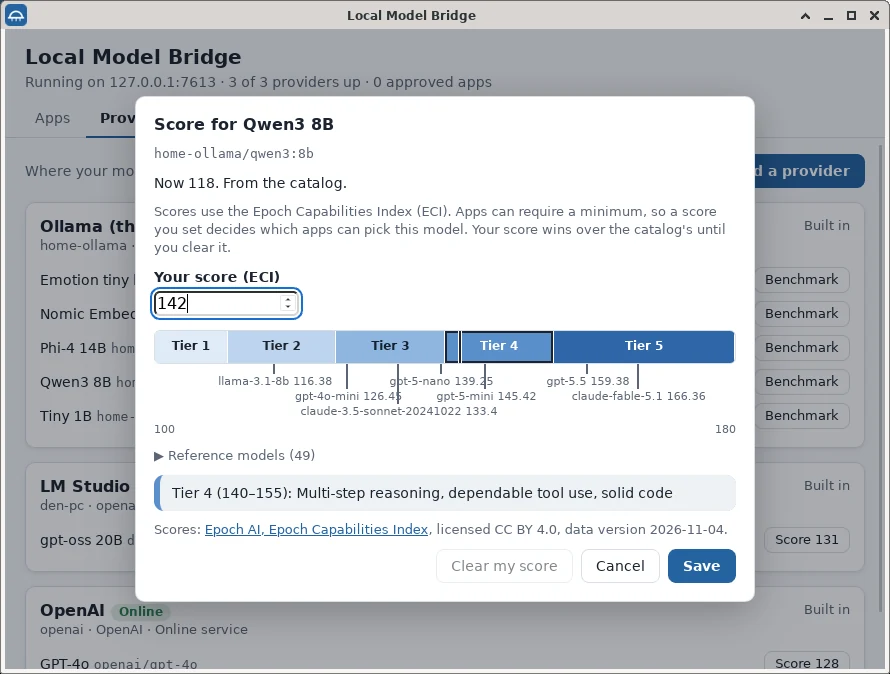
Approval is once per app, never forever. Remap a role, cap spending, turn tool use off, block one route or revoke the app entirely; it finds out at once.
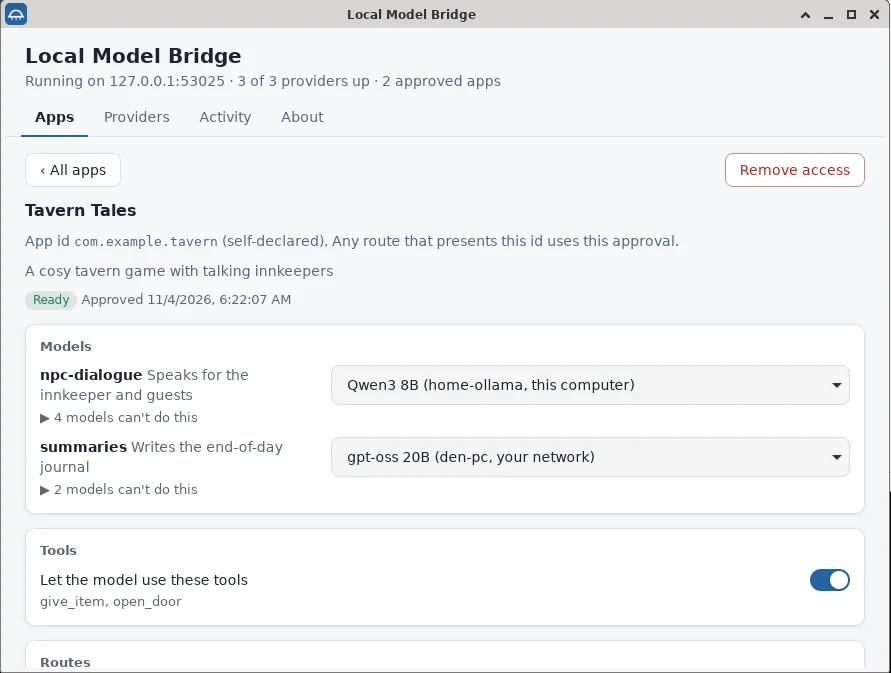
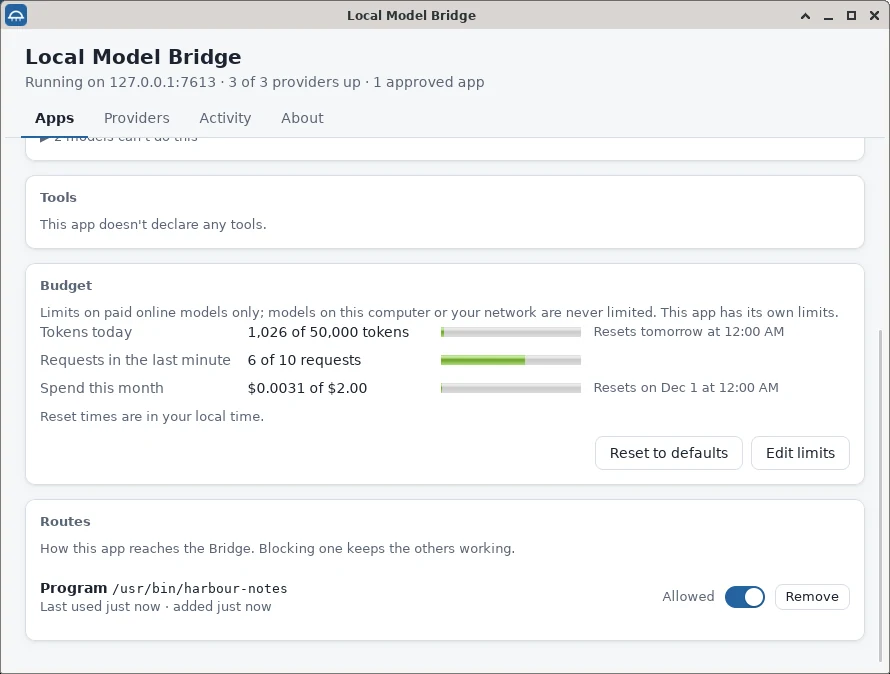
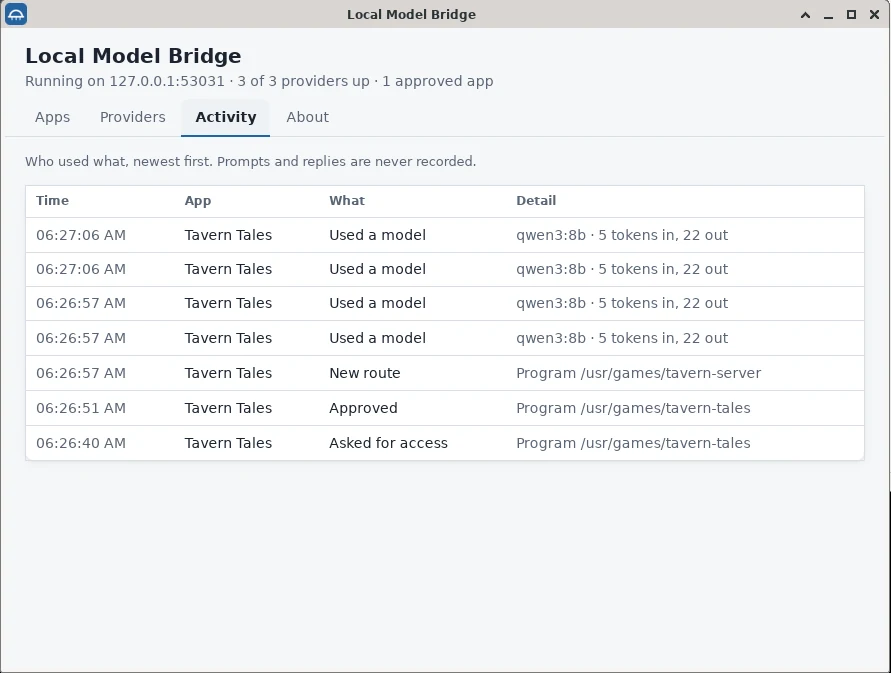
An app gets nothing until you approve it in BLAID's own window, and then only the roles, models, tools and spending you approved.
BLAID never listens on your network, and rejects any request whose Host header isn't localhost (a DNS-rebinding guard).
Pages arrive through the extension, which attaches the origin the browser reports, never what the page claims.
Provider keys live in the OS keychain. No endpoint returns them; apps and the extension never see them.
Logs keep times, app, model, token counts, tool names and errors. A CI check enforces it. There is no telemetry.
A small hand-written HTTP loop with size caps, fuzzed nightly along with the SSE parsers, native-messaging framing and request JSON.
The service is Rust, with a public threat model and a 22-item security self-review. What it can't do: protect you from malware already running as you, or prove a desktop app's identity (it shows the program's path instead). An outside security review comes before 1.0.
BLAID invents only what no standard covers: capability descriptors, requirement matching, roles, grants and detection states.
All five v1 milestones are built and merged, and the API is frozen. What's left before 1.0 needs people and machines more than code.
| Part | Covers | Working today | Still to do |
|---|---|---|---|
| Service and desktop app | Windows, macOS, Linux | Built; conformance suite runs on all three in CI | Real installs on a Mac and a Windows PC |
| Browser extension | Chrome | Per-site enable, consent and streaming work | Store listing |
| Browser extension | Firefox | Builds and passes web-ext lint | A first real run |
| Local providers | Ollama, llama.cpp, LM Studio, vLLM, LocalAI, Jan | Ollama tested against a real server; the others against documented responses | Live runs beyond Ollama |
| Online providers | OpenAI, Anthropic | Adapters, keychain and budgets built | Recorded live fixtures |
| SDKs | TypeScript, Python, C# + Unity, Lua (Luanti) | All v1; Luanti mod streams on a Luanti 5.10 server | Unity Editor builds; package publishing |
Leave your email for the release. Tell us what you'd build, and tick the box if you'll try the release candidate on your machine.